
Automating public tender tracking with AI speeds up the three jobs that take bidders the most time: finding relevant notices, reading specifications to extract the required documents, and never missing a deadline. For manufacturers bidding on public tenders in Türkiye, the system we built automated about 90% of the manual steps in the tender process, and a single person can now manage the whole workflow. The bid decision always stays with the company.
Where does the time go in public tenders?
EKAP (Elektronik Kamu Alımları Platformu, Türkiye’s Electronic Public Procurement Platform) is the official platform run by the Public Procurement Authority, where public tenders are announced, tender documents are downloaded and procedures are carried out. For a company that bids regularly, the work usually looks like this:
- Screening new notices every day and picking out those that match the company’s products or services,
- Downloading and reading the administrative and technical specifications of promising tenders,
- Extracting the required qualification documents, technical requirements and guarantee conditions one by one,
- Tracking bid deadlines and the windows for clarification requests and objections,
- Recording participation, bids and outcomes.
Most of this is reading, filtering and tracking. It takes several people’s time, and a missed date or document requirement can cost the tender.
What does AI do in this process?
In the system we built, the work is split into modules with clear roles:
- Notice tracking module: Regularly monitors notices published on EKAP and filters those that match the company’s line of business. Fit rules are defined by product groups, regions and preferred tender size.
- Specification analysis assistant: Reads administrative and technical specifications and extracts a summary, the list of required documents, technical requirements and key dates. Every extracted item is linked to its place in the specification, so the tender manager can jump back to the source and check it.
- Reminder module: Sends timely notifications to the right people for bid, tender and award dates.
- Tracking dashboard: Brings participation, bid and outcome data into one place. Over time, past tenders become the company’s own data archive.
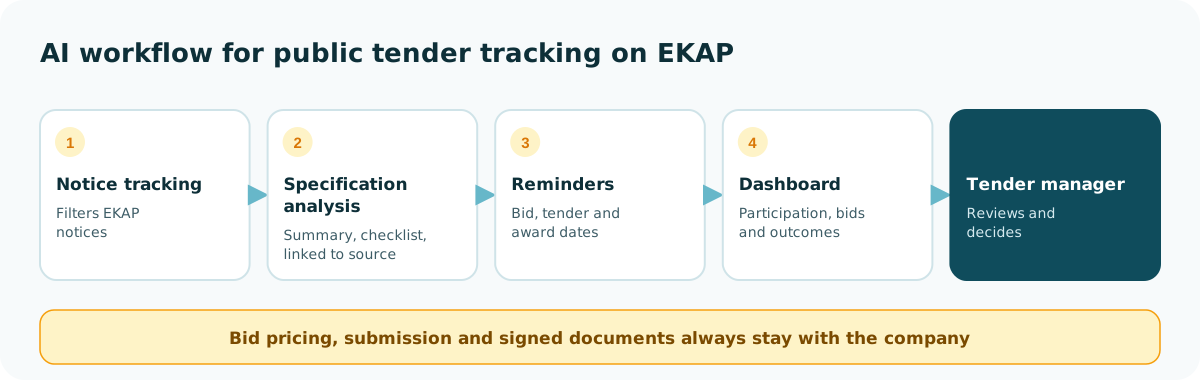
What it doesn’t do: It doesn’t set bid prices, submit bids on the company’s behalf or prepare signed documents. Those decisions and that responsibility stay with the company.
What we learned from our project
In the system we built for manufacturers bidding on public tenders (full case study: Automating public tender (EKAP) processes with AI):
- About 90% of the manual steps are now automated. Notice screening, specification summaries, document checklists and deadline tracking are prepared by the system.
- One person can now manage the process. Work that used to take several people now runs under the control of a single tender manager.
- Linking to the source built trust. Because the team could see where every item came from in the specification instead of trusting the AI’s summary blindly, they adopted the system faster.
What to watch out for
- Follow the platform’s rules: How you access notices must comply with the platform’s terms of use and access rules. Clarify this before you build.
- Keep a person on the final check: Interpreting a specification has legal and technical consequences. AI prepares the summary; the tender manager approves it.
- Don’t hide uncertainty: A well-designed system flags clauses it is unsure about instead of guessing. Unclear items go on the list of questions to raise with the contracting authority if needed.
- Keep data in-house: Bid prices and company documents are sensitive. Decide upfront where each piece of data is processed and who can access it.
How do you measure success?
| Metric | What it tells you |
|---|---|
| Screening time per notice | Time spent finding a relevant tender |
| Preparation time per specification | Time to read it and build the document list |
| Missed deadlines or missing documents | How reliable the process is |
| Tenders evaluated | How many tenders the same team can review |
| People assigned to the process | Time freed up in the team |
Where to start
- Define your scope: Which tender types, regions and sizes are right for you?
- Collect your past tenders: Specifications from tenders you bid on and won are the best starting point for the system’s fit rules.
- Start with tracking and summaries: Notice filtering and specification summaries deliver value fastest; the dashboard and archive come next.
- Measure: Note how long it takes today to assess a notice and prepare a specification, so you can show the improvement.
How BrotherhoodIO approaches it
We build public tender automation as part of our AI agents & process automation service, as a ready-made product adapted to your products and services. The system links every specification item to its source, leaves the bid decision and responsibility with your company, and keeps your data under your control.
To see where your tender process loses time, book a free 30-minute AI Assessment.
Author
Yusuf Öztürk Co-Founder, BrotherhoodIO
Co-founder of BrotherhoodIO, with more than 10 years of experience in the software industry. Today he builds AI agents, enterprise AI assistants and process automation systems for companies.
Frequently asked questions
Can AI submit tenders on our behalf?
No, and it shouldn't. The bid decision, pricing and signed documents are the company's responsibility. AI takes over preparation work such as tracking notices, summarizing specifications, building document checklists and sending deadline reminders; the decision and submission stay with people.
What if the AI misses a critical clause in a specification?
That is why the system links every item it extracts to its exact place in the specification (page and clause number) and flags anything it is unsure about. The tender manager does the final review; AI speeds that review up rather than replacing it.
Which companies is this for?
Manufacturers and suppliers that bid on public tenders regularly, screen many notices every week and spend significant time reading specifications and preparing documents.
How long does it take to set up?
In our own project the first version went live in three months. Today we adapt the same setup to new companies' product and service areas as a ready-made product.